A good port scanner is worth its weight in gold, and there’s no better port scanner (in terms of overall capability) than Network Mapper a.k.a NMap! Such a major part of information security and hacking that after being created in 1997 it was already in major Hollywood movies like The Matrix Reloaded by 2003.
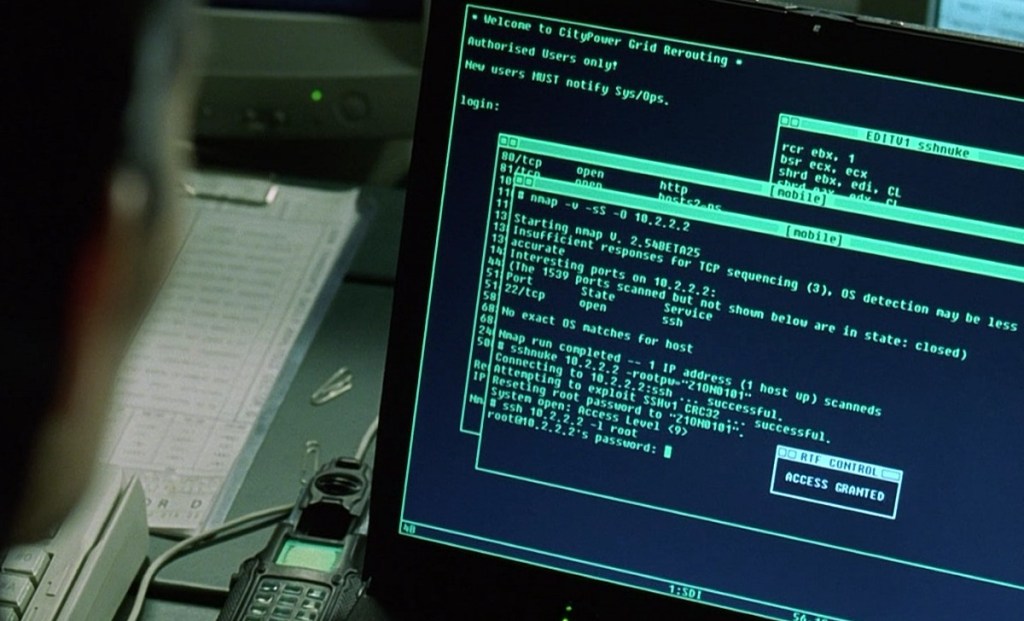
Fun Fact: The vulnerability (CVE-2001-0144) and exploit tool (ssh-nuke) that Trinity uses in that scene are real.
I once saw a guy in the YouTube comments for a video on hacking actually say, “Real hackers don’t use Nmap, they write their own port scanners.”

Today we’re going to talk about why that statement is stupid…….in most cases. There’s a reason why Nmap, and other established long-supported tools, are staples in the field.
The “Bring Your Own Tools” Fallacy

A Bring-Your-Own-Tools (BYOT) approach to every single engagement is a very Hollywood thing. It’s completely impractical, unrealistic, and unnecessary. Sure there may be times where you’re on an internal network without access to a proper port scanner. Then you can write a simple script to ping each target and specific ports. But you usually want something more robust.
Taking Nmap as our prime example, in the almost 30 years since it was created, it has been given a staggering number of features. It’s not just a port scanner. It has scripts for identifying specific CVEs, determining versions of operating systems and services, and in some cases, even attempting basic exploits.
If you were to write a port scanner on your own to even attempt a tenth of what Nmap does, it would be a massive undertaking. You’ll find tutorials for writing basic port scanners that just tell you whether or not a port is open (essentially a simple SYN or TCP Connect scan), but they’re laughably simplistic.
- Daniel Miessler has a great blog post about why basic SYN scans are easily spotted and blocked by IDS/IPS/NGFW solutions: https://danielmiessler.com/blog/synpackets
Think about it. You’d have to write separate logic for TCP, UDP, ICMP, and ARP. You’d have to program your scanner to parse countless different responses, handle the full TCP handshake (and know when not to), and support DNS resolution. Are you going to support parsing for the full range of ICMP codes? All types of DNS records? What about IPv6?
And that’s before even touching the features that make Nmap a surgical tool.
The Power You’re Trying to Replicate
Thinking about making your own tool comparable to Nmap quickly gets out of hand. Your simple Python, PowerShell, or Bash script can’t hope to do even 10% of what Nmap’s capable of.
Such as the following:
- Evading Simple Firewalls: A basic firewall might block inbound packets to all ports except 80 (Web) or 53 (DNS). Nmap lets you use the
-gor--source-portoption to send your scan packets from one of those “trusted” ports, potentially bypassing the rule entirely. - Every TCP Flag or None: SYN, ACK, RST, PSH, URG, FIN, whatever you want to fire off at your target, Nmap supports it. And you can even put together whatever combination you want with the
--scan-flagsoption. Wanna send SYN, RST, and URG simultaneously? Go for it. Or send no flags (a “null scan”). - Various Timing Controls: Worried about being too noisy or too slow? Nmap has timing templates from
-T0(paranoid) to-T5(insane). It also gives you granular control with flags like:--min-rate/--max-rate: Tell Nmap to send no fewer/more than X packets per second.--max-retries: Control how many times to re-try a port that seems to be filtered.--host-timeout: Give up on a host that isn’t responding.
- The Nmap Scripting Engine (NSE): This is the real killer. NSE is a massive library of scripts that automates everything from finding web server vulnerabilities to brute-forcing FTP credentials and detecting specific malware.
- Here’s the full list if you’re curious, or you could check out the scripts.db file in your local installation of Nmap.
Your homemade scanner can’t do all this without thousands of hours of work writing code, debugging, and testing against live, unpredictable networks. Why reinvent the wheel when a perfectly good, battle-tested, community-vetted scanner is free to use? It’s one thing to use a different one like rustscan or something, but you’re not writing anything like Nmap.
Another Option: Massscan (aka The Sledgehammer)
Now, if you want a basic port scanner that moves fast, breaks things (potentially), and doesn’t care about getting to know the target, Massscan is for you. This thing can potentially scan the entire internet in roughly 5 minutes and no, I’m not joking.
But you have to be extremely careful.
It can easily become a DDoS tool. The “damage” isn’t usually to the end-host server itself but to the network infrastructure in between.
Here’s how:
Massscan is built for one thing: raw speed. It achieves this by using its own custom, lightweight TCP/IP stack, bypassing the host OS to send packets as fast as the hardware will allow. This can easily be 10 million packets per second.
A commercial firewall, load balancer, or even a high-end router has to maintain a “state table” to track all active connections. When you send a SYN packet, the firewall adds an entry to that table and waits for the connection to complete.
Massscan can send so many unique packets (often with a spoofed source IP) so fast that it completely fills this state table, consuming all the device’s available memory. This is a state-table exhaustion attack.
Once that table is full, the firewall or router can’t process any new, legitimate connections. Real users, real customers, and critical monitoring services get dropped. The network is effectively offline.
You have just DDoSed your target without even meaning to.
Now to be fair most modern NGFWs probably wouldn’t be susceptible to this, but it lets you know just how easy it is to screw things up when it comes to manipulating aspects of networking.
So, next time someone says, “Real hackers write their own tools,” ask them if their tool can do all that, and if it knows how not to knock an entire company offline by accident. Chances are, it can’t.
 HandsOnKB
Sound off in the comments about anything InfoSec or InfoTech.